Prelaunch Checklist Training
Here is a quick outline of the website launch process followed by a checklist to work from as you prepare content for your refreshed website launch.
Website Launch Process
- When the site is ready to launch, submit the Website Review Request Form.
- The site will undergo a pre-review to confirm the site is ready for the review process. The review will include accessibility, technical, and editorial evaluations. The publisher will be emailed a list of items to remediate.
- After the remediation is completed, the website will be ready to launch.
- IT will launch the website. Once the launch is complete, the publisher will receive an email confirming that the website is live. (The site may be briefly out of sync for about 5 to 10 minutes during the launch process).
Launch Prep Checklist
This checklist can be consulted while you’re building your site, but most importantly – please make sure you’ve addressed all items on the list before you “hand in” your site for launch. Doing so will help ensure a smoother, faster process.
- All Pages Final: Page content is complete, clear, and free of placeholders or lorem ipsum text.
- Accurate and Updated: Faculty/staff directories, program details, academic deadlines, event dates, and statistics are current.
- Voice & Tone: Content reflects the Cal Poly Pomona brand and voice and speaks to the primary target audience (prospective or current students, faculty, etc.).
- Spelling & Grammar: Proofread for errors using tools or peer review.
- Navigation: All menus, links, and buttons work as intended across all devices.
- Tables & Lists Properly Formatted: Tables and lists are not misaligned on mobile.
- Consistent Styles: Fonts, buttons, and page layouts match design standards and templates.
- Functional Testing: All internal and external links, including site menu and sub-menu/dropdowns, are working and direct to the correct pages.
- Downloads Work: PDFs, course curriculum, or brochures open correctly and are up to date.
- Interactive Elements: Calendars, forms, and maps function properly.
- Alt Text for Images: All images include meaningful and accurate alternative text.
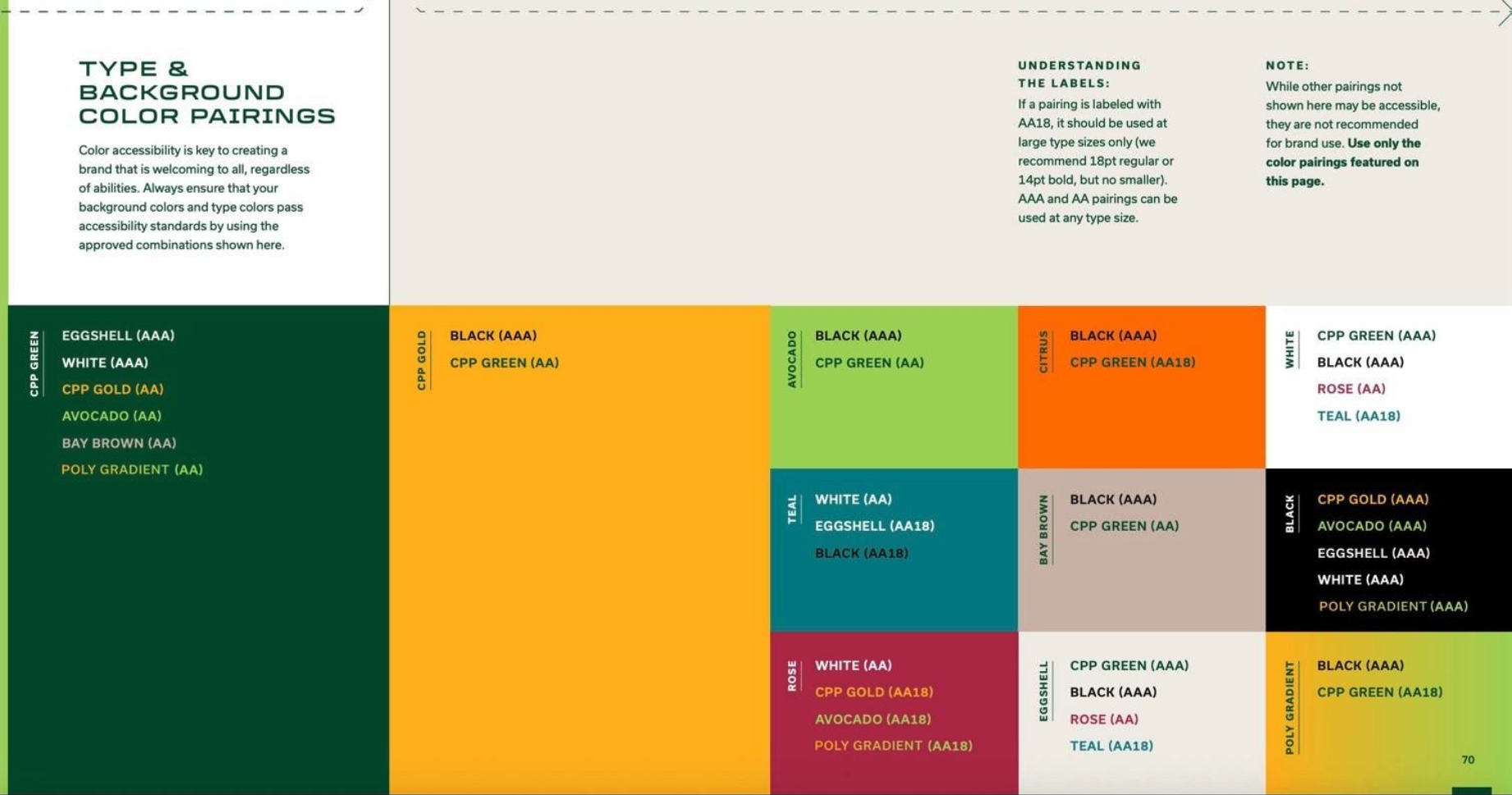
- Color Contrast: Text meets WCAG color contrast guidelines. See accessible brand color pairings in Appendix A.
- Link and Button Text: Descriptive and avoids generic phrases like "click here."
- Test Your Site’s Accessibility: You can use this tool to identify accessibility issues before you “hand in” your site. While it doesn’t replace the testing that our ATI group will do, using it should allow you to have fewer issues and thus, a smoother launch. https://wave.webaim.org/
- Responsive Design: Site displays correctly on desktop, tablet, and mobile.
- Page Titles & Page Description: These are descriptive, unique, concise, and include keywords.
- URL Review: URLs are clean, lowercase, and use hyphens (not underscores).
- 301 Redirects: If you’ve changed any URLs, request has been submitted to IT for redirects to the new URLs.
- Internal Review Completed: Multiple team members have tested the site.
- Stakeholder Sign-Off: Key department leaders have reviewed and approved the final version in test.
- Staging Site: Staging environment matches what you expect to see in production.
- Navigation: Be sure to publish your navigation and check all menu item links.
- Footer: Be sure to publish your footer.
- Launch Date Confirmed: Coordinated with Strategic Communications and IT/ CPP Web team.
- Analytics Installed: Google Analytics tags are installed and verified.
Appendix A
Accessible color pairings in brand palette (see p 69 of Brand Guidelines).
Submit For Review
After completing all items on the prelaunch checklist, you can submit your website for review and launch. If needed, you can request an urgent launch deadline for the website to be launched by.