Heading Structure
What is a heading?
Implementing Accessible Headings
In general, you should use a heading whenever you start a new section (or subsection) of content. Take the following example.
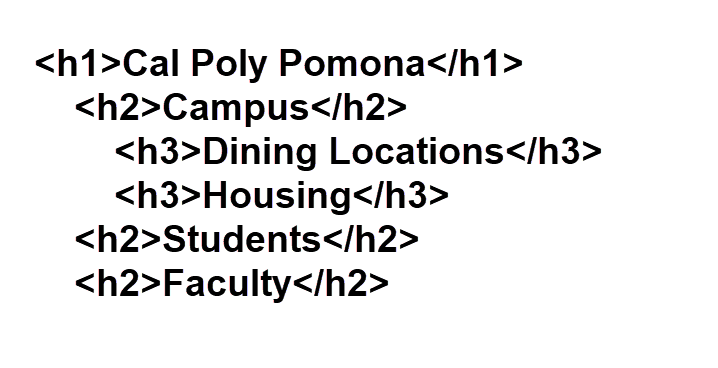
Would it make sense to include the “Students” heading as a heading level 3 under “Campus”? Probably not. If you come across information on your website that seems like either a new topic or a specific part of the current topic, it is best to create a new heading to organize the page.
DO use descriptive heading text. While some heading text may make sense in the context of your page, users of assistive technology often navigate using just the headings outside of context. Having non-descriptive heading text (or sentence fragments such as “Here you can”) makes the page less accessible for everyone.
DON’T skip heading levels. While it may be tempting to skip heading levels because a topic seems much less important than its parent section, this can cause confusion for screen reader users who may think that they have missed a section. In the example below, heading level 3 is skipped between “Campus” and “Dining Locations”. This creates an illogical structure that may lead to difficulty in navigating the page.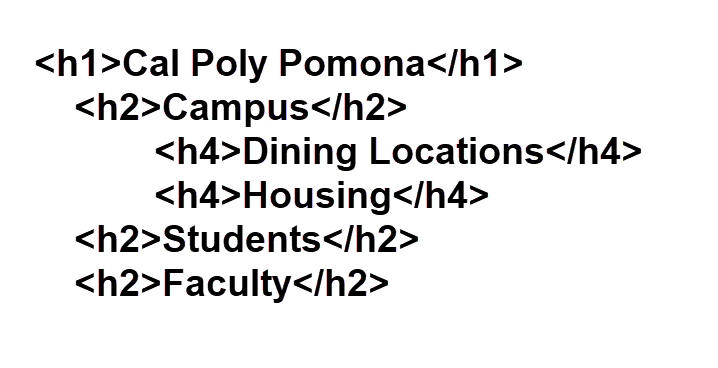
Is it ever okay to skip heading levels? Only if there is content that is repeated on multiple pages. There, continuity is more important than heading organization.
Common Errors
Remember to maintain your headings even when creating content in the Cascade text editor. Empty heading levels should be removed or given a descriptive text for the content it represents.
Use WAVE to identify the empty heading above.
Also be careful to always maintain a proper heading structure that best organizes your content for assistive technology users. Skipped headings occur when two headings skip down a level (ex. h2 to h4). This can indicate a missing "h3" content. Heading levels traversing upwards (ex. h4 to h2) indicate a change in content and are not considered skipped.
The "Skipped Heading Level" (h3) accordion fails because of the empty "h1" from the previous accordion. As such always be careful about the heading levels you use in the Cascade text editor. Use WAVE to see the heading level examples below:
Good Example Heading Level
The heading above is considered a perfect example of proper heading level usage. It is a heading level 4 and tells the user that the content is related to the content of the "Skipped Heading Level" (h3).
Bad Example Heading Level
The heading above is considered a poor example of proper heading level usage. It is a heading level 6 and as such assistive technology users may search for content from heading level 4 or level 5, believing it was accidentally skipped.
Bad Example Heading Level
While the heading above is not marked as an error in WAVE, it is still considered a poor example of heading level usage. It is a heading level 1. As such assistive technology users will expect the content to be much different than the content before and may not group this information as part of "Common Errors".