Social Media Accessibility
Overview
However, the fast changing and interactive nature of social media can also create challenges. Some platforms and tools don't fully support digital accessibility, which can make it hard for users of assistive technology to navigate them.
Social Media accounts at Cal Poly Pomona must ensure that the content they publish is accessible to all audiences.
General Guidelines
All images should have alternative text (alt text). Social media platforms such as Facebook, Instagram, X (formerly Twitter), and LinkedIn give users the ability to add alt text for images.
When adding alt text to images, it is important to consider:
- Reviewing and modifying image descriptions that are automatically generated to maintain accuracy
- Avoid including alternative text within the post description, as screen reader users will hear the description twice
- Checking if text within an image follows Contrast and Color Accessibility Requirements
In certain situations, it may be necessary to provide a full description of the image, and users can add additional details if they prefer. Such descriptions are relevant for images that include prominent details that someone may be interested in, such as names or specific people or specific actions happening. When adding image descriptions, keep in mind the following:
- Image descriptions should add to alt text, and highlight details that may be important to other people
- Image descriptions are normally located at the bottom of posts and provide clarification as to what the poster is communicating with the image
Example Image:
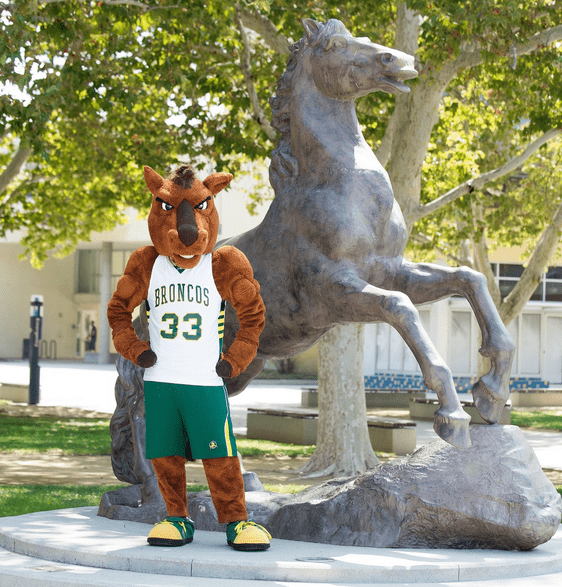
Example Image Alternative Text: Billy Bronco poses with his hands by his hips in front of a horse statue.
Example Image Description: Billy Bronco, Cal Poly Pomona's horse mascot, stands in athletic attire with his hands on his hips in front of the Bronco statue located west of the Residential Suites.
All videos should have captions to allow users who are without hearing, hard-of-hearing, and non-native speakers to perceive the information in a video.
Captions come in two main forms:
- Closed captions let viewers choose whether to turn the captions on or off.
- Open captions are always visible because the text is embedded into the video and cannot be turned off.
When integrating captions within a video, it is important to consider the following:
- Auto-generated captions should be human-verified for accuracy.
- Text on the screen must follow Contrast and Color Accessibility Requirements.
- Video and other media should not play automatically on default. This type of content can be a barrier for users with cognitive impairments, photosensitive epilepsy, ADHD, and other conditions. Users should have the ability to pause videos and other media. Users should also be notified if media plays by default e.g., "This video will automatically play in a new window".
See our Video Accessibility page for more information.
GIFs are not available to publish on every platform, and not all platforms allow users to add alt text to GIFs. If GIFs don't have alt text, if may be difficult for users who rely on screen readers to interpret the content. Do not rely on a GIF to be the main source of information in a post. Confirm that the post can be understood through text alone. Also consider adding a brief description in brackets at the end of a post to account for the issue.
Use CamelCase convention for hashtags in social media posts, capitalizing the first letter of each word - #AccessibilityAtCalPolyPomona. This formatting allows screen readers to hear the words individually rather than a long incoherent word. It is also important to limit the use of hashtags in each post, as screen readers will read all hashtags to users.
Screen readers will read emojis as their description, e.g., "clapping hands". Because of this, it can be confusing if emojis are placed between words. Do not overuse emojis in posts, and place a space between each one.
Emoticons, or representations of expressions used through a variety of keystrokes, e.g., :), will be read as "semicolon parenthesis" and should be used sparingly, if at all.
Ensure that infographics meet Contrast and Color Accessibility Requirements. Include alt text if the infographic conveys information.
Keep URLs short whenever possible because screen readers will read each character out to users. See Link Text Accessibility for more information.
Ensure that PDF documents that are linked in your content are tagged properly and accessible. Visit PDF Accessibility for more guidance on how to make your documents accessible.
Avoid the use of uncommon acronyms and abbreviations. This can make content hard to understand.
Specific Social Media Platform Guidelines
It is important to consider the following when uploading content to X:
- Users are able to add text to photos and animated GIFs on X by choosing "add description" after the file is uploaded
- Users are able to add captions to videos by:
- Uploading .SRT files via the Media Studio Library
- Adding embedding captions with the video
- Uploading video to YouTube and adding captions there, and then linking the video in your post
- Use CamelCase for hashtags, do not place emojis between words, and limit the number of emojis and hashtags in your post. See general guidelines for more details
- Limit the number of handles you mention in your post, as screen readers will read them out
- It is not recommended to use unicode text because it is often inaccessible to screen readers
- See more at X Accessibility Information
It is important to consider the following when uploading content to Facebook:
- Facebook automatically adds alt text to images, but it is recommended that users review and edit the autogenerated alt text. This is done by clicking "options" on the photo and choosing "change alt text"
- Captions can be added to videos by uploading .SRT files. Alternatively, you can use the auto-generated captions by Facebook, but review and edit the auto-generated captions as necessary to maintain accuracy
- Provide live captions to live events whenever possible. If it is not possible to have captions as the event is proceeding, provide captions as soon as possible after the event.
- It is not recommended to use unicode because it is often inaccessible to screen readers
- See more at Facebook: Creating Accessible Content and Facebook Accessibility portal
It is important to consider the following when uploading content to Instagram:
- When publishing live on Instagram, the "Advanced Settings" at the bottom of the page features a "Write Alt Text" option under the accessibility option
- Videos posted as feed posts or reels will need embedded captions. Captions are available for Stories, but should be reviewed and edited before publishing
- Use CamelCase for hashtags, avoid placing emojis between words, and limit the number of hashtags and emojis in your post
- See more at Advancing Accessibility on Instagram and Accessibility | Instagram Help Center
It is important to consider the following when uploading content to Instagram:
- Users can add alt text to images by choosing "add alt text" after uploaded. On desktop, if users don't add alt text, LinkedIn may automatically generate it after the post. Users can edit the text anytime
- Users can add captions to videos by uploading the .SRT file. The mobile application does not allow users to add captions
- See more at LinkedIn Accessibility and Creating Accessible Content on LinkedIn