Headings
Instructions
Headings in Section Content define the semantic structure of the page by establishing a logical content hierarchy (H1 to H6), which helps browsers, assistive technologies, and search engines correctly interpret relationships between sections and subsections. In Cascade CMS, they should be used to organize content in sequential heading order rather than for visual styling, ensuring accessibility compliance, improved SEO, and consistent template rendering.
NOTE: Do not use Heading 1 or Heading 2 in this editor, as those levels are reserved by the template for the page title and the section content heading field.
For guidance on proper heading structure and accessibility best practices, please refer to the W3C page structure tutorial: Headings | W3C WAI
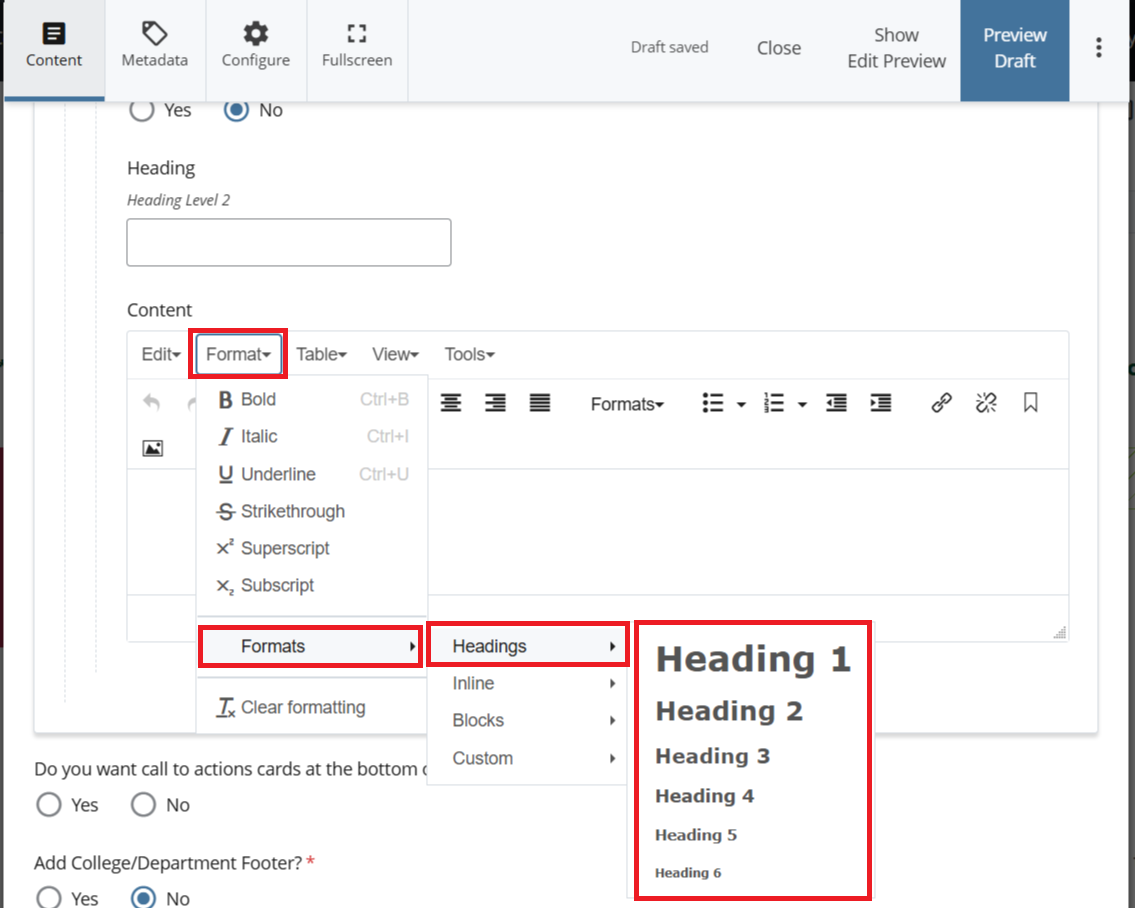
- In the Section Content editor, click Format in the toolbar menu.
- Select Formats, then choose Headings from the submenu.
- Apply only Heading 3 through Heading 6 as needed to create a logical content hierarchy.
- Use headings in sequential order (for example, Heading 3 -> Heading 4) without skipping levels.
- Reserve Heading 1 and Heading 2 for the page title and section heading fields already provided by the Cascade template.