College Department Websites
Recommendations & Best Practices for Structuring
As we’ve worked with campus partners on Cal Poly Pomona’s Website Refresh project, we’re often asked about best practices in structuring a website. The following are recommendations based on research, search engine optimization and accessibility needs, along with a few requirements so your pages link properly to other content in our website architecture. FAQs are included at the end.
Navigation Menu
- REQUIRED: Your top menu can only contain up to eight concisely-worded items horizontally. Why?
- To keep the menu from wrapping to a second line
- To help users easily find content. Usability testing has shown that users have difficulty finding things when there are more than eight choices.
- You can have drop downs from each of your menu items. There is no limit to the number of drop-down items, but no more than eight to ten is recommended for a good user experience.
- Your top menu be task or topic-based rather than audience-based, as topics are often useful to more than one audience. For example, future students may want to see what a current student’s curriculum looks like.
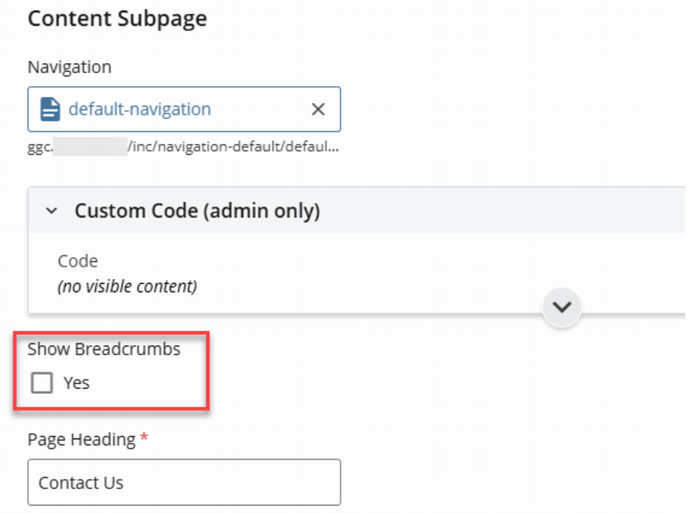
- If your navigation menu is different than the one on the college’s home page, be sure to include a link back to the college home page on your site. You can do this by enabling breadcrumbs on your department content subpages and including a link back to the College homepage in your About menu.
To enable breadcrumbs, navigate to the Cascade Editor and find the "Show Breadcrumbs" field. Then, toggle "Yes".
Below are two examples of strong navigation menus and the types of content users would expect under each menu item. Note the following:
- The example only includes six items, allowing you to split up some of the six or add menu items unique to your situation (e.g., facilities, labs, awards, forms, etc.). Your menu should reflect what’s most important to your department.
- Academics should appear towards the start of the menu structure and, depending on the department, break out undergraduate and graduate programs.
- If research is important to the department, make it a main menu item.
- If the department only has only a few news or event items per year, or if the college handles all news and events, “News” and “Events” could be housed within "About" and not take up space on the main menu.
- Support & Alumni would not be needed if alumni and donations are handled at the college level.
| Main Level Menu Items | |||||||
|---|---|---|---|---|---|---|---|
| Home | Academics (or Programs) | Student Resources | Faculty & Research | Centers | News & Events | About | Alumni & Giving |
| Menu SubItems | Undergraduate Programs (Majors) Curriculum Graduate Programs Research PolyX Courses |
Advising Scholarships Internship Career Clubs & Organizations |
Faculty Directory Faculty Showcase |
Center #1 Center #2 Community Program, Club or Other Offering #1 Community Program, Club or Other Offering #2 |
News or Newsletter Events Announcements |
About Us Department Directory Mission Accreditation Directions College Home Contact Us |
Make a Gift Alumni Board |
| Main Level Menu Items | |||||||
|---|---|---|---|---|---|---|---|
| Home | Academics | Student Resources | Our Department | Research | Contact Us | Support & Alumni | |
| Menu SubItems | Undergraduate Programs (Majors) Curriculum Graduate Programs Research Assessment PolyX Courses Academic Resources |
Advising Scholarships Internship Career Clubs & Organizations Mentor Centers |
About Us (includes mission/vision) Faculty Directory Faculty Showcase Outcomes Accreditation News Events College Home |
Highlights Research Areas Labs & Groups Partners |
Directions Contact Us |
Make a Gift Alumni Board |
|
Department Site Content
Academic Programs
- Prospective students’ first question is “Do you have my major?” To address this, CPP has an academic program search that leads to Program Pages (e.g., Aerospace Engineering) where prospectives can get a high-level overview of our offerings.
- StratComm has built these for all undergraduate academic programs and is in the process of building them for graduate programs and certificates. We will not build Program Pages for minors.
- The Program Pages have a link to the department pages, where prospectives can learn more.
- REQUIRED: Build your department page to include more in-depth information about your academic programs, including the curriculum. We are using the San Diego State model:
- Program Page (high-level info): https://www.sdsu.edu/programs/accounting
- Department Page (in-depth, curriculum): https://business.sdsu.edu/undergrad/accountancy
Minors
- For accessibility purposes, each minor listed on the academic program search must link to a distinct URL.
- REQUIRED: Departments must have at least one page about minors so we can link from the search to that page.
- You can either create one page about minors and use anchor links (the link takes you to the exact place on the page where the info is located) OR create one page for each minor. We recommend the former to reduce the number of pages on your site.
- If you don’t know how to create anchor links, submit an IT ticket.
Scholarships
- Prospective students are very concerned about paying for college and seek information on scholarships. If your department offers scholarships, please include a page listing them and link to the Bronco Scholarship Portal.
- We will highlight these scholarships on the Program Pages and link to your scholarship pages.
FAQs
A: A few comments on photos:
- Photos on Canto will provide the best quality for your site. Cell phone images from your personal collection may not look great due to their size limitations.
- Here are recommended sizes for your photos (guidance in Cascade may not be correct): Photo Size Recommendations.xlsx .
- One facet of the CPP brand personality is “real” – so please use photos of real students, not stock photos.
- If you don’t find what you need in Canto, please contact University Photographer Tom Zasadzinski at tzasadzinski@cpp.edu to see what’s possible.
A: Each template has specific modules and flexibility to address the vast majority of needs while working together in an effective architecture for a better user experience. StratComm and IT have a list of template and module enhancements we are working against over the next year and will let publishers know when they are implemented. If there is something you want to request, or if you have a specific functionality needed on your site, please submit a ticket . StratComm can also advise on different ways to display your information using the new modules; contact Karen Lindell at klindell@cpp.edu.
A: The publisher is responsible for refreshing their website. IT and StratComm are happy to advise, and IT can transfer image and document files for you in Cascade (submit a ticket), but the web files are the responsibility of the publisher. If you have the budget and would like to hire help, contact Karen Lindell at klindell@cpp.edu for freelancer/contractor recommendations.